
 Download
Sternzeichen Eigenschaftenr
1.1 January 22, 2026- 7.8
- 1
- 2
- 3
- 4
- 5


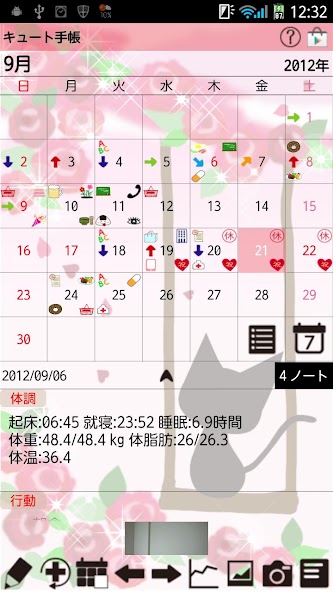
Daily events,health conditions just by tapping a pensil button on the calendar!
Save and manage daily events and health conditions just by tapping a pensil (Event) button on the calendar!
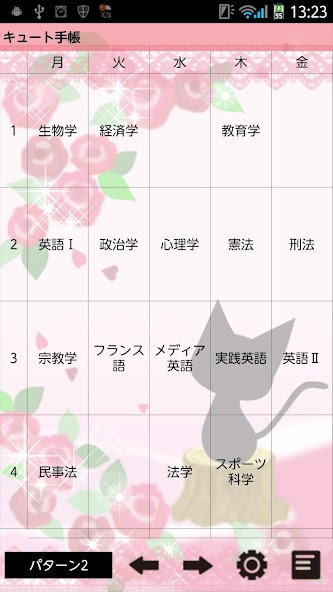
A Timetable function for students! It can be used in a different way as well! You can use it as you like!
Save notes with tag names and sort them to folders! Use it as to-do list!
Handwriting Memo function for a quick memo or to share an image with a memo with your family and friends!
Manage also daily and repeated plans so you can use as an organizer!
This is a multifunction app but very simple to use!
*Cute Day Planner does not sync with Google Calendar.
How to use Cute Day Planner
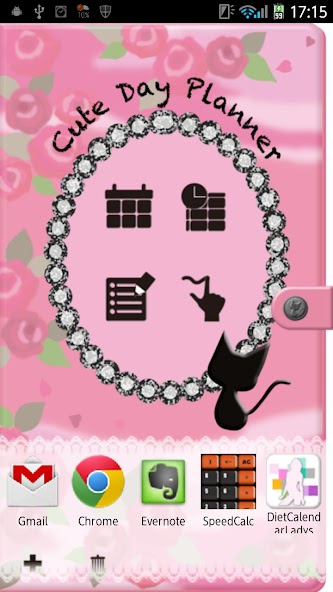
The initial window is a cover of the organizer.
1. Tap the gray button with a cat to set a password.
2. Tap + button to add another apps to use them while using Cute Day Planner. This is very convenient function! You don't need to close CuteDayPlanner to use another apps!
*How to do it*
1. Tap a black + button on the white lace. You can see the list of apps that have installed on your mobile. Select apps.
2. Drag app to delete.
*Buttons of the cover*
1. Calendar:Move to a calendar. Manage daily and repeated plans.
2. Timetable: Move to a timetable. It is for students but it can be used in different ways. Use it as you like.
3. Note: Save notes with tag names. Manage them with tag holders! Use as to-do list!
4. Handwriting memo: Make a quick memo or share photos with memo with your family and friends!
*Calendar*
Tap "Calendar" button on the cover.
1. Select a day then tap Pensil button (Event button) or "Tap here to create Event lists." on the calendar. Move to "Daily To-Do".
1. Tap "Action" tag of "Daily To-Do".
2. You can see the list of the default event icons. Let's tap "Medication" icon as a sample.
3. A pop-up "Medication" appears. the upper right button shows the time you tapped the icon. You can change the time for example, the time when you have to take the madication or the time you took the madication. X button is to clear the time when you don't need to save the time. You can save memo, set the alarm. Tap "Save" to finish and go back to the calendar. You can confirm saved events on the list of the calendar. You can save more events in the same way.
4. When you want to save an event that does not have on the list, but not want to register a new event icon on the list, tap "Add Event" icon (calendar & black +). Enter the title name, change the time (if it is necessary), save memo, tap calendar & black + to change the icon. Tap "Save" to finish.
5. When you want to add a new event icon on the list, Tap "Add" button (black +). A pop-up appears.
1. Add:add a new event icon and save with this button.
2. Back:go back to Daily To-Do.
3. Tap (hand & +) to change the icon.
1. Event name.
2. Select the sort. If you save 999, the icon will be added at the end of the list.
3. SelectItem: You can create subcategories here.
4. Finish and save with Add button.
Customize the event list as you like!
*Condition Tag*
Save records here just by tapping each buttons! It is very simple!
You can save, Wake-up time/Bed time/Sleeping hours/Conditions(face icons)/Weight/Fat rate/Temperature (the basal body temperature)/Blood pressure/Pulse and Memo.
Each item can be displayed by a graph (Tap "Graph" button on the calendar.).
*Buttons of the calendar/from the left*
1.Today : Go back today's date.
2&3. Left & Right button: Move the date right to left.
4. Graph button: You can see graphs of Daily To-Do.
5. Photo List button: Move to Photo window.
6. Camera button: Take photos or select photos from the gallery of the mobile.
7. Menu button: Move to another apps or another windows.














 Action Adventure
 Simulated Business
 Role Playing
 Sports Competition
 Casual Puzzle
 Card Strategy
 Music Rhythm
 Word Puzzle
 Flight Shooting
 Love Development
 Business Office
 Communication and Social
 Lifestyle and Entertainment
 Online Shopping
 Utility Tools
 Travel Travel
 Finance
 Education Learning
 Information Reading
 Sports and Health